

Epson Smart Panel
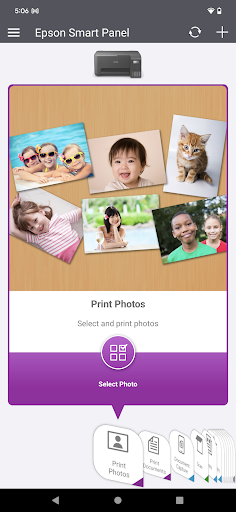
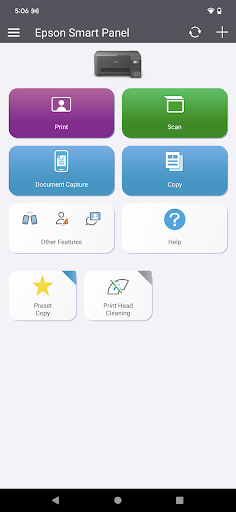
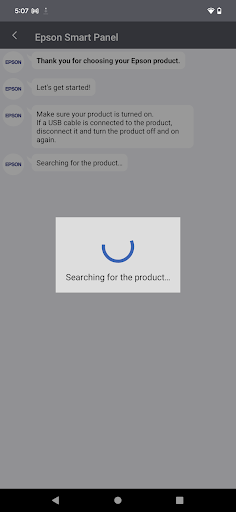
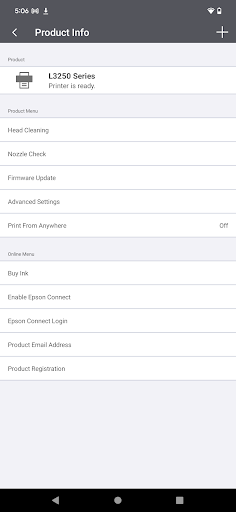
Epson Smart Panel App Info
-
App Name
Epson Smart Panel
-
Package Name
com.epson.epsonsmart
-
Developer
Seiko Epson Corporation -
Category
Tools -
Updated
2026/02/18
-
Version
5.2.2
Reviewer’s View: A Window into Epson Smart Panel App
The Epson Smart Panel app has emerged as a versatile command center for managing Epson printers and scanners via mobile devices. The process begins with an easy Epson Smart Panel download and installation, available through both Android and iOS platforms. Upon launching the app, users swiftly navigate through its well-organized interface, which is tailored to individual devices through an auto-configuration feature. It's essential to ensure your printer or scanner is supported, which can be confirmed by visiting the specified Epson website. Once confirmed, the app seamlessly performs the setup, connecting your Epson device to your Wi-Fi network painlessly. The initial Epson Smart Panel installation paves the way for enhanced functionality, allowing users to monitor, operate, and even troubleshoot their Epson devices from the palm of their hand. Logging in to the Epson Smart Panel provides additional features, including device registration and easy access to supply orders and Epson support.
The Bright Spots: Highlights of Epson Smart Panel App
1. **User-Friendly Setup**: The app shines with its straightforward setup process. Once you download and install the Epson Smart Panel app, connecting your device to Wi-Fi is intuitive and expeditious, making it accessible even to those with minimal technical prowess.
2. **Innovative Design**: The app's design incorporates action tiles that significantly simplify the user's interaction with Epson products. The interface is clear and reduces the steps needed to perform tasks, enhancing usability across both Android and iOS devices.
3. **Seamless Customization**: By automatically configuring and tailoring the experience to the specific Epson device, the app ensures that users receive a customized interface that maximizes efficiency and ease of use.
4. **Comprehensive Support System**: The app integrates support features such as registration, supply ordering, and troubleshooting in one place. This eliminates the need to navigate multiple platforms for support, enhancing convenience for Epson device users.
Room for Improvement: Limitations of Epson Smart Panel App
1. **Device Compatibility**: The app’s usefulness is limited to those Epson models listed on the support website. Users with other Epson products must resort to alternative apps like Epson iPrint or Document Scan, restricting the app’s utility for some.
2. **Connectivity Issues**: Some users may experience sporadic connectivity issues, where the app fails to establish or maintain a stable connection with the printer or scanner, especially on crowded networks.
3. **Data Charges**: While the free Epson Smart Panel app itself is without cost, users must be mindful of potential data usage fees incurred during setup and operation, particularly if not connected to Wi-Fi.
4. **Complex Troubleshooting**: Although support is centralized, users sometimes find that the troubleshooting steps provided within the app are insufficient for more complex issues, necessitating external assistance.
What’s New: Upgrades in the Latest Version of the App
In response to user feedback, the latest updates in the Epson Smart Panel app improve its core functionalities significantly. The recent update has streamlined the Epson Smart Panel apk for quicker download speeds and a smoother installation process. Enhancements have been made to improve Wi-Fi connectivity stability, addressing common user complaints from previous versions. Additionally, the latest version allows for quicker login into the Epson Smart Panel, providing faster access to all available functions. The upgrade also includes an expanded list of supported devices, making it more inclusive for a broader range of Epson hardware users. Finally, subtle improvements in the user interface aim to further declutter and optimize the navigational experience, ensuring that users of all tech-savviness levels can efficiently operate their devices through the app.


